


Update
September 9, 2026 · 5 min read
Feature shipped September 7, 2026
One Sequence, Many Useful Outputs: Rendering Without Losing the Edit
By Zonic Team
Archive note: This professional-output milestone was reached on September 7, 2026, building on cloud-render work shipped August 24. We added this retrospective release note in September 2026.
A generated edit should remain an edit
A finished MP4 is useful for watching and sharing. It is a poor boundary for professional collaboration.
Editors need to adjust a cut, replace a source, inspect a subtitle, rebalance audio, or continue finishing in another application. If AI returns only flattened pixels, much of its work has to be recreated by hand.
Zonic treats the sequence as the durable result. The sequence describes source ranges, timing, lanes, audio choices, subtitles, text and supported layout decisions. The same validated structure drives the in-app preview, the rendered output, and professional project handoff.
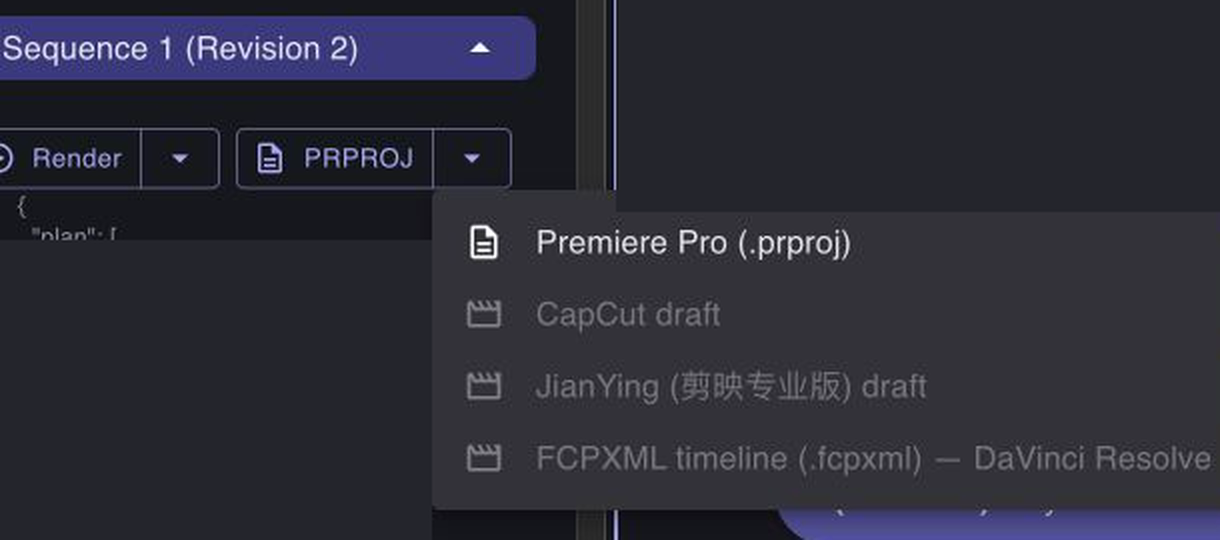
The Sequence panel keeps a watchable render and professional export choices beside the editable plan.
Preview for decisions, render for delivery
The live preview helps an expert inspect the current sequence quickly. It is built for iteration: check the order, examine a composed frame, identify a problem, and revise.
Rendering produces a video artifact from that same sequence. In Cloud mode, long renders can move into a background job rather than depending on one browser request staying open. Local and Hybrid workflows can keep media-dependent work close to the editor's machine. Availability and output quality still depend on the project mode, source media, and selected target.
Keeping preview and render tied to one sequence avoids a dangerous failure mode: approving one interpretation and exporting another. Zonic tests shared timing and presentation decisions across output paths, with particular attention to captions, text placement, canvas, frame rate, and multitrack audio.
Continue in a professional editor
The sequence can also be translated into formats used by professional editing applications:
- Adobe Premiere Pro: Zonic generates a
.prprojproject for continued editing with relinkable source media. - CapCut and JianYing: supported local workflows generate draft structures for compatible versions. The international CapCut and newer JianYing formats do not have identical constraints, so Zonic reports target availability rather than treating them as one universal export.
- DaVinci Resolve: a locally verified adapter carries supported editorial structure into Resolve. Resolve does not interpret every effect or text behavior the same way as Premiere, so capability checks remain part of the handoff.
Final Cut Pro is a planned destination, not a shipped claim today.
No interchange format preserves everything equally. Clips, timing, tracks, transitions, titles, audio levels, and transforms each have target-specific rules. Zonic's approach is to declare those capabilities, compile from one sequence, and expose warnings when an instruction cannot travel faithfully. Silent data loss is not an acceptable export strategy.
Why the output layer matters to video intelligence
Rendering can look like the final mechanical step. For Zonic, it is part of the intelligence product.
The AI has to understand not only which moments are relevant, but how a decision becomes a valid edit. The expert needs to see that decision, correct it, and carry it into the rest of production. The sequence contract connects those stages:
- Nandemo turns footage into time-based evidence.
- Dekiru reasons over that evidence and proposes sequence operations.
- The expert reviews and changes the sequence.
- Preview, render, and export express the same decision for different purposes.
This is how AI assistance becomes operational rather than disposable. The generated work remains inspectable, editable, and compatible with a professional handoff.
The larger ambition is not to own every finishing interface. It is to make video intelligence useful wherever the expert needs it—inside Zonic for understanding and iteration, and inside established tools for detailed craft and delivery.
Read the rest of the series: Skill Studio and Teach Zonic, reference video, and the dockable expert workspace. For the full product direction, read Video Intelligence Is an Expert–AI Problem.