


Release
September 9, 2026 · 4 min read
Feature shipped August 26, 2026
Skill Studio and Teach Zonic: Turning Expert Judgment into a Reusable Workflow
By Zonic Team
Archive note: Skill Studio and Teach Zonic shipped on August 26, 2026. We added this retrospective release note in September 2026 to document the product's development.
A better starting point than an empty prompt
“Edit this video” is rarely a complete brief. A useful first cut depends on the job: an interview highlight needs a different structure from a multicamera event, and subtitle cleanup requires different evidence from visual selection.
Skill Studio gives editors clear starting points for common work. The first release includes four built-in cards:
- First Cut turns analyzed footage into an initial editable sequence.
- Highlight Reel finds strong visual moments or quotes around a chosen goal.
- Multicam Edit aligns coverage of the same event and creates angle changes.
- Subtitles creates clean, timed captions, including supported multilingual arrangements.
Each card opens a short set of useful controls and still leaves room for the editor to explain what matters. A card is not a rigid template and it is not a one-click promise. It selects the right editorial capability, gathers the brief, and gives Zonic a more reliable place to begin.
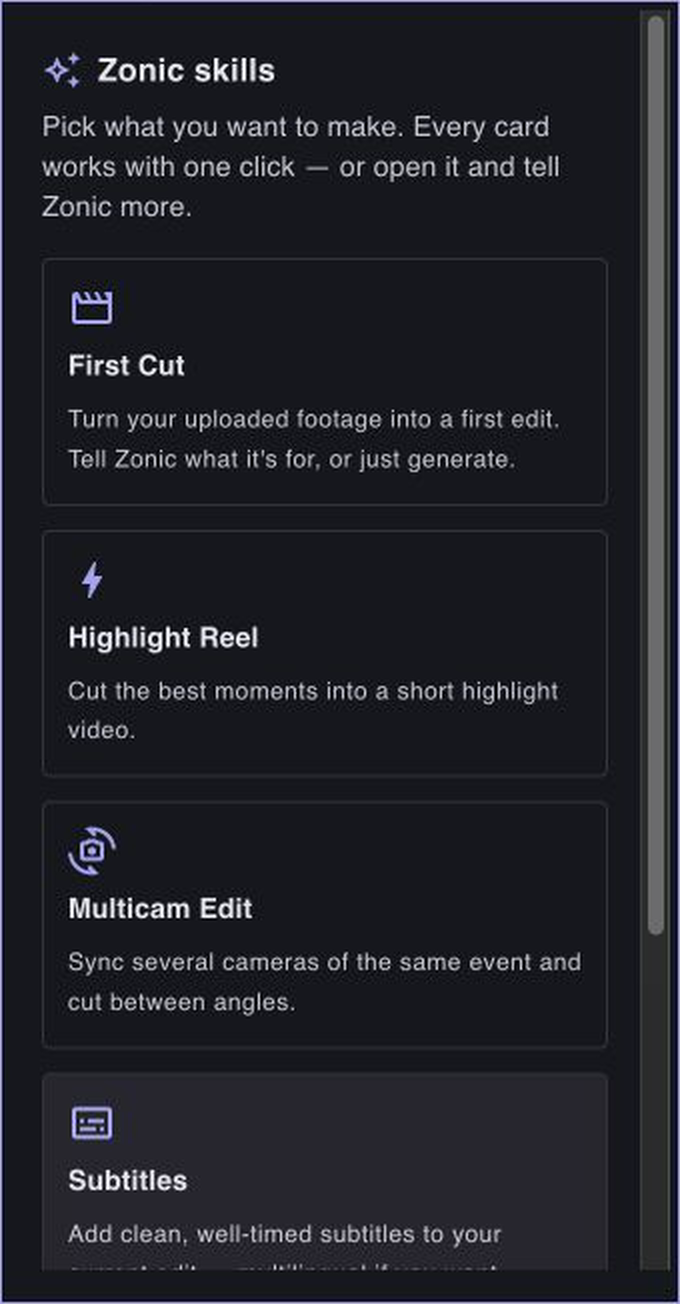
Skill Studio keeps built-in starting points and an expert's personal skills together in the same panel.
Teach the way you work
Built-in skills cover repeatable editorial structures. They cannot know every team's terminology, approval pattern, pacing preference, or definition of a good handoff.
That is why the Studio also includes Teach Zonic.
After working through a real project in chat, an expert can ask Zonic to identify a reusable method from that conversation. Zonic examines the instructions and corrections, drafts a personal skill, and returns it for review. The expert can refine that draft before saving it. Once saved, the skill is available as an intentional starting point in another project.
The review step matters. A correction that was right for one production may be wrong as a universal rule. “Establish location before action” can be a dependable editorial principle. “Always use two-second cuts” is more likely a preference for one format. Teach Zonic is designed to make that distinction visible instead of silently turning every comment into permanent behavior.
Expert–AI interaction as a product surface
Most AI creative tools focus on the prompt and the result. We think the working method between them is equally valuable.
Skill Studio makes that method inspectable:
- The expert chooses a known editorial job.
- Zonic applies the relevant footage intelligence and sequence tools.
- The expert reviews the edit and explains corrections.
- Teach Zonic turns proven project experience into a draft method.
- The expert decides whether that method should be saved and reused.
Today, this is deliberate, explicit learning. Zonic does not claim to absorb every finished project automatically, and personal skills are not promoted into shared system behavior without evaluation. That boundary protects future edits from accidental overfitting.
The longer-term opportunity is larger: an organization should be able to preserve the judgment behind its best work, not only the final media file. Skills are one way to turn that knowledge into something editors and AI can use together.
Read next: how reference video gives Zonic creative context, or see why we describe Zonic as an expert–AI video-intelligence company.