


From raw footage to usable intelligence.
Record live or upload hours of video, then understand it, find evidence, answer long-form questions, and build editable sequences you finish in Premiere Pro, DaVinci Resolve or CapCut — in the Workbench or through the open Platform API.
Zonic Nandemo
AI's Five Senses
Zonic Dekiru
AI's Brain
How it works
From footage to answers and production
01
Connect or Record Footage
Upload to managed Cloud storage, work from a Hybrid proxy workflow or a Local workspace, or record cameras, phones and live streams straight into a project.
02
Understand and Reason
Transcripts, scenes, people, metadata, and semantic indexes turn long recordings into searchable evidence, answers, comparisons, and editorial decisions.
03
Review, Share and Produce
Revise the sequence, share it by link for review, render it, or open it in Premiere Pro, DaVinci Resolve or CapCut. Human corrections create the signal for better editorial skills without claiming automatic learning that has not shipped.
Live capture
Record the event. Cut it before it ends.
Bring cameras, phones and live streams into one project on a computer at the venue. Zonic understands the footage while it is still recording, so you can search it, ask about it and build sequences during the event.
Paid plans
Cameras and capture cards
Record a camera or a switcher output through an HDMI capture card, or any webcam. Several cameras can record into the same project at once.
Live streams
Push RTMP or SRT from OBS, a hardware encoder or a streaming camera over the local network, or pull an RTSP camera. A short Wi-Fi dropout does not end the recording.
Phones
Record from a phone's browser into the project through the venue computer. The EagleShot app for iOS and Android is coming soon.
Understood while it records
Transcripts and scene descriptions are built as the recording grows, so the first hour is searchable while the second is still being recorded.
Edit during the event
Ask Dekiru for highlights, quotes or a recap sequence while recording continues. A second device can prompt and review at the same time.
Watch and share live
The receiving computer shows recordings from other devices live, and share links let a producer or client review cuts before the event is over.
Live capture runs on a computer at the venue with the Zonic desktop app installed.
Architecture
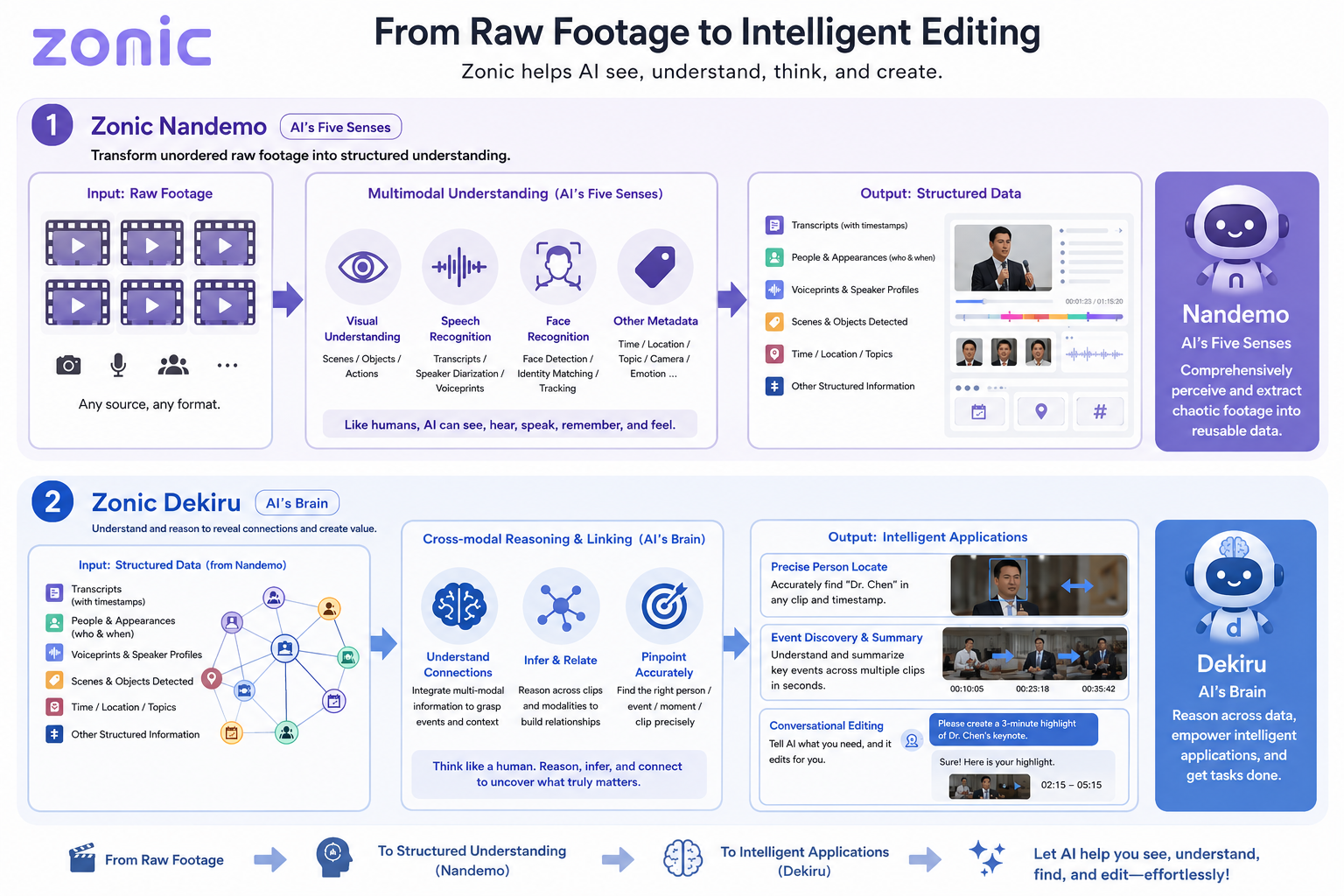
Two systems: one sees, one thinks
No single model sees everything, and each one fails differently. Zonic splits the job in two — and the second half exists to catch what the first half got wrong.
Zonic Nandemo
AI's Five Senses
Turns unordered raw footage into structured, searchable understanding — every modality read at once, by the model best suited to it.
Visual understanding — scenes, objects, actions
Speech — transcripts, speaker diarization, voiceprints
Faces — detection, identity matching, tracking
Metadata — time, location, camera, topic
Zonic Dekiru
AI's Brain
Reasons across everything Nandemo extracted, cross-references the signals to correct what any single model got wrong, and only then commits an edit.
Cross-modal reasoning — links people, speech and scenes
Correction by triangulation, not by majority vote
Precise retrieval — the right moment, not the right file
Conversational editing — say it, and it cuts
Products and execution
Two products. Three ways to run the work.
Workbench and Platform share intelligence kernels, but they are separate products. Cloud, Hybrid, and Local decide where media and compute live — including browser and user-device capacity that can reduce managed infrastructure cost.
Zonic Workbench
The interactive Next.js product for projects, live capture, conversation, human review, sequence revision, sharing, preview, rendering, export, and execution-mode choice.
Zonic Platform API
A separately consumable REST, MCP, and connector product for headless ingestion, long-video understanding, retrieval, and supported asynchronous jobs.
Distributed execution modes
HORIZONTAL CLOUD SCALE
Cloud
Managed storage and independent cloud jobs provide horizontal scale. The browser coordinates uploads and can preprocess video to reduce transfer size.
CLIENT-DISTRIBUTED SCALE
Hybrid
Full-resolution media work stays near local files while proxies and scalable intelligence use the cloud. Each user contributes CPU and storage, lowering cloud-heavy media cost.
USER-DEVICE SCALE
Local
Media and production workloads use the user's filesystem, CPU, and storage. It scales to that machine and is not yet fully offline because selected model providers still require network access.
Capabilities
What Zonic can do
Ready capabilities, conditional workflows, and explicit non-capabilities — every status comes from one shared capability contract.
Ready
Projects and Source Libraries
Organize footage and metadata by stable project and source identity in Workbench or through the Platform API.
Conditional
Live Capture
Record cameras, phones and RTMP/SRT streams into a project and search them while they record. Paid plans, with the Zonic desktop app.
Ready
Scene Understanding
Detect and describe actions, people, locations, objects, and visual events with precise source time ranges.
Ready
Long-Video Semantic Search
Find visual moments and spoken passages by meaning across long recordings and multiple sources, with timestamped evidence.
Ready
Evidence-Backed VideoQA
Ask questions across scenes, transcripts, and people through Workbench, Project MCP, or the account connector.
Conditional
Cross-Source Reasoning
Compare and synthesize evidence across sources when the required indexes are complete; output quality remains task-dependent.
Ready
Automated Rough Cut
Dekiru turns analyzed footage into an editable sequence using task-specific editorial skills and source evidence.
Ready
Human Sequence Review
Inspect, reorder, trim, and revise an AI-authored sequence while preserving the human correction signal.
Ready
Share Links for Review
Share a sequence or hand-picked footage by link. Reviewers see only what you shared.
Ready
Subtitles in Several Languages
Generate subtitles for a sequence, review each language cue by cue, and import or export SRT.
Ready
Premiere Pro Round Trip
Generate a relinkable .prproj with supported sequence structure, media, captions, audio, and graphics. Bring the saved project back and Zonic keeps your Premiere edit as a new version of the sequence.
Ready
DaVinci Resolve Export
Generate an .fcpxml with cuts, transitions, speed changes, titles and subtitles, or import it straight into a running Resolve.
Conditional
CapCut and JianYing Drafts
Install a supported draft when the target application and local filesystem are available; parity is target-dependent.
Conditional
Open Platform API
Run headless ingestion, analysis, retrieval, and supported asynchronous agent jobs as a separate product from Workbench.
Not shipped
Automatic Finished-Project Learning
Automatically learning from arbitrary completed editor projects is part of the vision, but is not shipped today.
From the Team
Latest from Zonic
Tutorials, release notes, and insights from the engineering team.
Vision
The Learning Loop
Human review creates training signals today. Automatic learning from arbitrary finished projects remains the next loop, not a shipped capability.
Expert Edits
Raw footage in
Zonic Sequence
AI rough cut
Editor Refines
In Premiere Pro
Delta Decoded
What changed?
Model Improves
Training signal
Better Sequences
Smarter cuts
Today
Creators edit. Zonic assists.
- ✓
Automated rough cut from raw footage
- ✓
Live capture and multi-source scene understanding
- ✓
Premiere Pro, DaVinci Resolve and CapCut export
- ✓
Premiere edits come back as new versions
Vision · Not Shipped
Automatic learning from finished projects.
- →
Decode finished .prproj files — no explicit feedback required
- →
Direct supervised learning from professional editors
- →
Every timeline edit is a training signal
- →
Continuously improves across all users
Demo
See Zonic in Action
Ready to get back to the story?
Join creators and studios already using Zonic — or book a call to see how it fits your workflow.
100 free credits · analysis from 1 credit per minute · AI editing billed by usage.